Loopic 2.4 Release Notes

Loopic 2.4 brings a redesigned timeline, a smarter code editor, a more flexible masking system and Google Fonts. The new Preview Mode lets you test your graphic exactly as it will run in playout, as OGraf, and render it straight to video.
Redesigned timeline
The Timeline panel has been redesigned to be cleaner and easier to work with:
- New playback controls
- New zoom controls, with touchpad support
- Redesigned layers and actions
- Only keyframed properties are shown under each layer
Code editor improvements
The code editor is now bigger and understands the Actions API:
- Autocomplete for the Actions API
- Warnings about likely mistakes, such as misspelled properties or values that may be undefined
- Editing tools like search and replace, rename symbol, change all occurrences and code formatting
New masking system
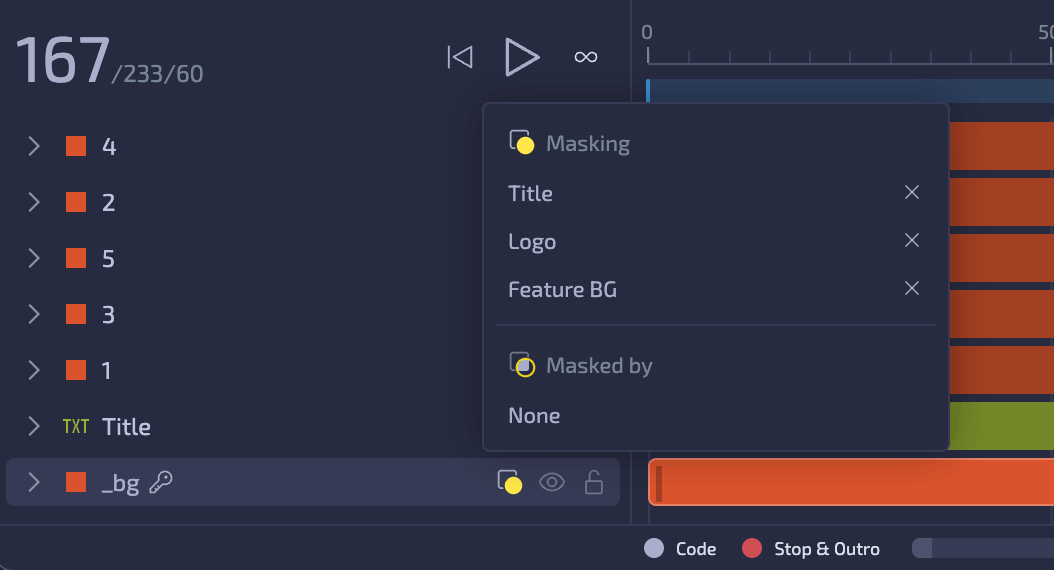
Masks have been completely reworked. Mask layers are no longer nested inside the layers they mask, and they no longer have to be hidden - you can show or hide a mask layer at any time, and it keeps masking either way.
A mask layer behaves just like any other layer: move it, resize it or animate it, and the masked area follows.
A single mask layer can now mask multiple layers at once.
Click the mask icon on any layer in the timeline to see its mask links - the layers it masks and the layers masking it.
Google Fonts
The entire Google Fonts library is now available right in the Text inspector. Google Fonts you use are embedded in exported graphics, so they render correctly even without an internet connection.
Preview Mode
Use the new Edit / Preview switch in the app bar to jump between editing your composition and previewing it.
Preview Mode plays your composition as an OGraf graphic - the exact same package you get when exporting to OGraf - so what you see in preview is what you ship.
Real-time
Real-time preview plays the graphic live, just like a playout system would. Use the Play, Update, Stop and Custom buttons to trigger OGraf actions, and set each action's parameters in the inspector on the right.
Non-real-time
Non-real-time preview lets you scrub through the animation frame by frame. Build a sequence of scheduled actions on the timeline and fine-tune them in the inspector.
Video export
You can now render your graphics to a video file without leaving Loopic. In Non-real-time preview, choose the format, quality and scale, pick where to save the file, and follow the rendering progress.
Bug fixes and other improvements
- Undo, redo, cut, copy and paste are now available on Free and Starter plans
- The Renderer panel zooms towards the mouse pointer or pinch center
- New "Fit end to workspace" layer option
- Redesigned Home pages
- When Export can't save to the selected folder, you can download the file or choose another folder
- Fixed keyframes being lost when pasted onto duplicated or pasted layers
- Fixed text shadow being lost when duplicating, pasting or reopening a Project
- Fixed resizing SVG layers
- Fixed converting very old Project files
- And many more...
Compatibility
When you open an existing Project in Loopic 2.4, it is converted to the new format. Projects saved in Loopic 2.4 can't be opened in earlier versions, so keep a copy if you might need to go back.
🔙 Accessing the Previous Version
Need to use Loopic 2.3? It's still available at old.app.loopic.io for a limited time.